Built for Routing Complexity
Plan around real-world routing constraints such as vehicle capacity, stop demand, fleet limits, route distance, workload balance, and route policy.

LogiAI
LogiAI helps teams build, optimize, and evaluate routing plans using vehicle capacity, stop demand, routing constraints, fleet policy, and AI-assisted explanations.
Explore CVRP Routing through the Pro Console and test the routing path that fits your operational challenge.
Need a routing solution for unique workflows, constraints, or integrations? Talk to us
What is LogiAI?
LogiAI is MAG OptiAI's optimization product for routing and logistics complexity. It helps teams turn vehicle capacity, stop demand, and routing constraints into feasible, explainable, and decision-ready route plans.
LogiAI helps organizations plan delivery routes, assign stops to vehicles, review route performance, and evaluate routing trade-offs before dispatch. It is built for routing environments where manual planning, spreadsheets, or simple tools become difficult to manage because of capacity limits, stop demand, fleet size, workload balance, and changing fleet policies or service assumptions.
Instead of treating routing as a manual dispatch task, LogiAI turns routing into a guided decision workflow. Teams can define vehicles, stops, demand, capacity limits, and routing assumptions, then run optimization, review route outputs, understand trade-offs, and evaluate alternatives before execution.
LogiAI makes routing optimization practical without requiring every organization to build an internal Operations Research, Data Science, or optimization engineering team from scratch. The optimization complexity runs behind the scenes, while users stay focused on the logistics decisions they need to make.
LogiAI also supports applied learning environments where instructors, students, and training teams need to understand routing optimization through practical, visual, and explainable workflows.
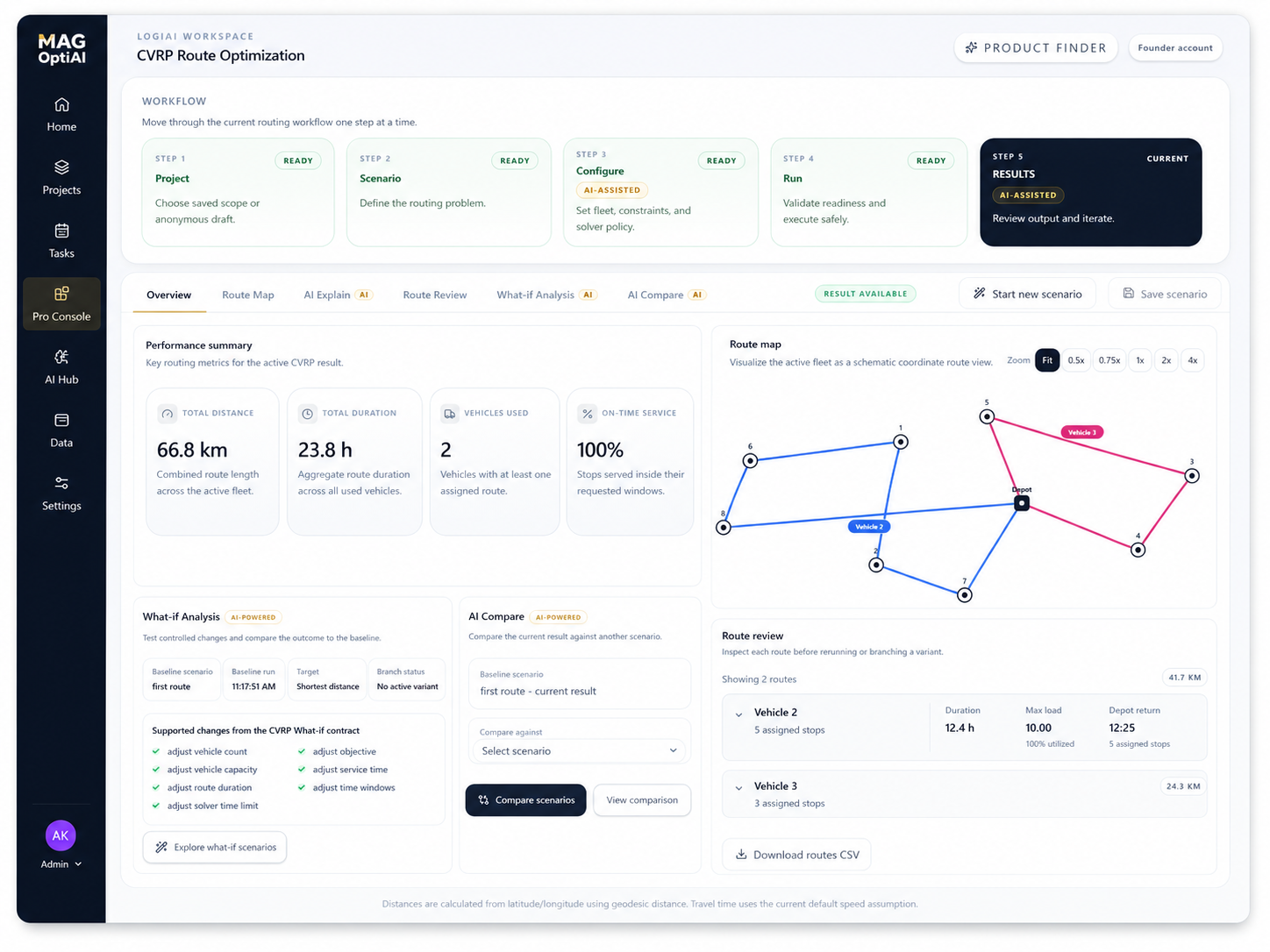
Plan around real-world routing constraints such as vehicle capacity, stop demand, fleet limits, route distance, workload balance, and route policy.
Use routing optimization through a guided workflow without needing specialized optimization expertise from scratch.
Review feasible routes, understand trade-offs, compare routing alternatives, and make clearer decisions before dispatch.
Support real logistics planning while also helping learners understand how routing optimization works in practical scenarios.
LogiAI workflow
Start with CVRP Routing inside LogiAI. The Pro Console guides you from routing scenario setup and constraint configuration to optimization, results review, and AI-assisted explanation.
Turn vehicle and stop data into feasible, capacity-aware routes.
Plan vehicles, depots, stops, demand, and capacity limits in one routing workflow. LogiAI helps logistics teams assign stops to vehicles, reduce manual routing effort, review route KPIs, and evaluate routing alternatives before dispatch.
LogiAI features
LogiAI brings routing setup, constraint configuration, optimization, result review, AI-assisted explanation, what-if testing, and scenario comparison into one guided workflow.
Shared Routing Optimization Experience
One system. Seven capabilities. Better routing decisions.
Structure vehicles, depots, stops, demand, and routing requirements into a route-ready scenario.
Define the fleet limits, route limits, objectives, solver settings, and assumptions that shape the final routes.
Use AI guidance to review solver settings, objectives, assumptions, and configuration choices before running optimization.
Generate routes that respect the selected data, constraints, objectives, and fleet policy.
Review route maps, assignments, arrival and service timing, and KPIs to understand performance and trade-offs.
Understand why the routes look the way they do, which constraints shaped them, and what trade-offs influenced the result.
Test changes, compare alternatives, and evaluate how different assumptions, constraints, objectives, or fleet policies affect the routes before execution.
Built to help teams structure, optimize, explain, compare, and decide with more confidence.
Intelligent guidance at every step.
Your data stays protected.
Designed for real operational decisions.
Pro Console access
LogiAI is accessible through the Pro Console with a guided CVRP Routing workflow and AI-assisted tools. Start free to explore capacity-aware routing, review route outputs, and evaluate whether LogiAI fits your logistics planning needs.
01
Start with the available routing workflow inside LogiAI.
You can
02
Follow a structured workflow inside the Pro Console to set up your routing scenario, run optimization, and review explainable results.
You can
03
Use free access to understand how LogiAI works, test CVRP Routing, and evaluate whether the workflow fits your needs.
You can
04
When your needs grow, scale with larger routing scenarios, higher usage, collaboration, and integration-ready outputs.
You can
Use LogiAI to explore routing workflows first, then expand when your planning needs require more capacity, support, or integration.
Need a custom or enterprise setup?
Contact usUse cases
See how LogiAI helps logistics teams turn vehicle capacity, stop demand, and route constraints into clearer dispatch decisions.
See how LogiAI helps logistics teams preserve delivery windows while comparing depot location, vehicle capacity, and route-consolidation decisions.
A 100% on-time route plan can still be operationally expensive.
A GTA delivery team served 76 time-windowed stops from a legacy west depot, but the feasible baseline still required 13 vehicles, 762.7 km, and 87.8 aggregate route hours.
Problem
Long route distance, tight fleet capacity, and hard delivery windows.
LogiAI workflow
CVRP Routing compares depot and fleet-policy changes against the same time-windowed stop set.
Outcome
Lower route burden, one fewer vehicle, and the same customer promise.