Built for operational intelligence
Work with forecasts, anomalies, risk signals, extracted fields, and document insights across practical AI workflows.

Operational AI
Operational AI helps teams turn operational data, documents, and business signals into practical AI workflows for forecasting, anomaly detection, fraud detection, data extraction, and document intelligence.
Explore Operational AI through the Pro Console and choose the workflow that fits your operational challenge.
Need an AI workflow for unique data, documents, risks, or operational processes? Talk to us
What is Operational AI?
Operational AI is MAG OptiAI's AI solution family for operational data, business signals, and document-driven workflows. It helps teams turn forecasts, anomalies, risk indicators, extracted data, and document insights into explainable, decision-ready outputs.
It is built for environments where teams need clearer forecasting, earlier signal detection, faster document understanding, and practical AI support without building a custom AI system from scratch.
Instead of treating operational data as scattered reports or manual analysis tasks, Operational AI turns it into a guided workflow. Teams can upload data or documents, choose the right workspace, review outputs, inspect evidence, and evaluate what the result means for the business decision in front of them.
The AI complexity runs behind the scenes, while users stay focused on the signals, risks, forecasts, documents, and decisions they need to understand.
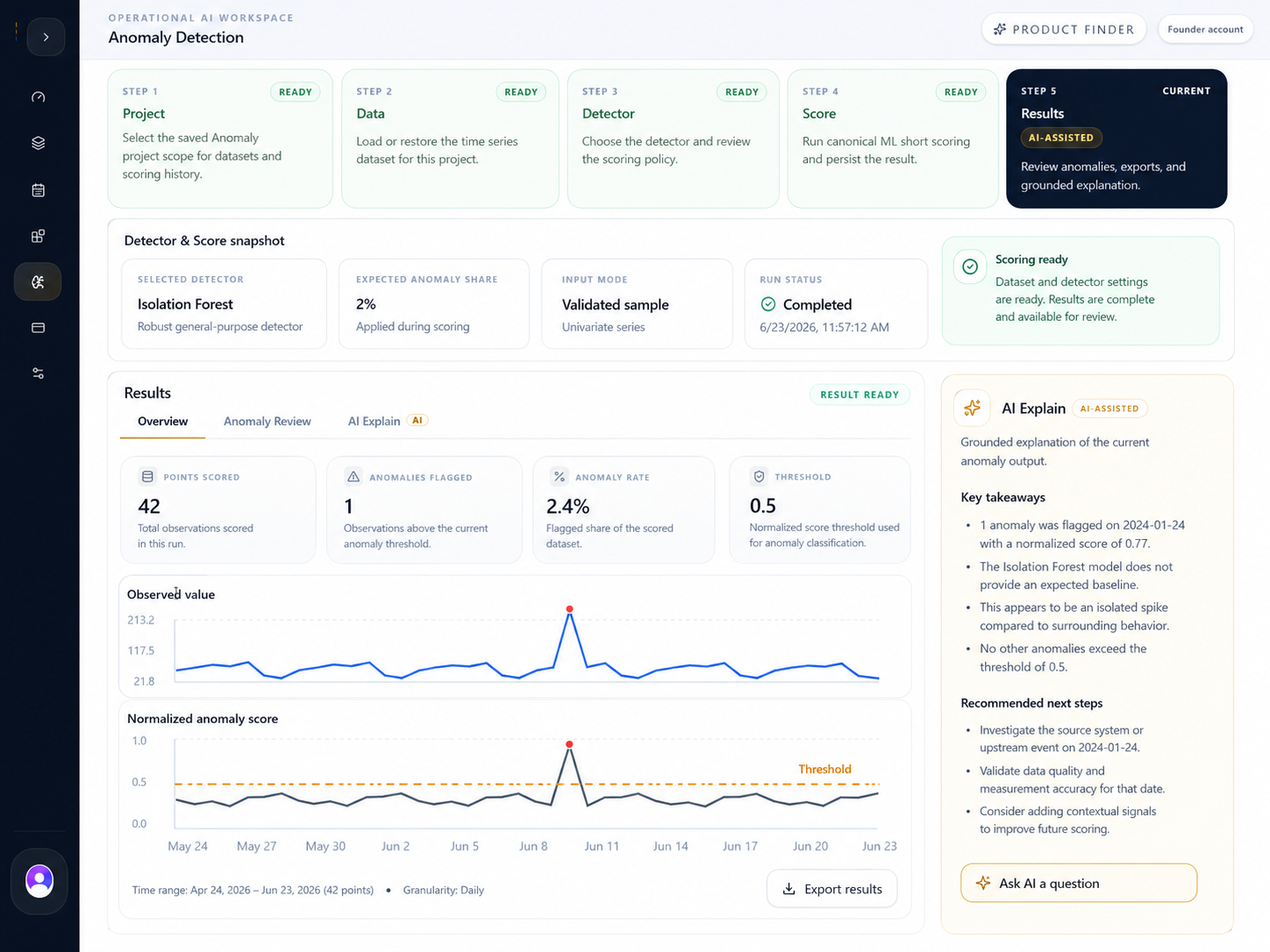
Work with forecasts, anomalies, risk signals, extracted fields, and document insights across practical AI workflows.
Use forecasting, detection, extraction, and document intelligence through guided workspaces without starting from a blank technical project.
Review outputs, evidence, metrics, and model context before deciding what the result means for the workflow in front of you.
Support real business workflows while helping teams understand applied AI through practical, visual, and explainable experiences.
Operational AI products
Our five Operational AI products help you turn operational data, business signals, and documents into explainable, decision-ready outputs.
Ask grounded questions over project documents with supporting evidence.
Create a project, upload documents, ask natural-language questions, and review answers with citations, retrieved excerpts, conversation history, and exportable evidence.
Turn operational documents into structured JSON and reviewable evidence.
Upload a document, run a persisted extraction, inspect structured fields, review raw evidence, and export JSON or source text for downstream workflows.

Train saved time-series models and generate planning-ready forecasts.
Create a project, train or stage a saved model, generate forecasts, review model metrics, inspect forecast charts and tables, and export results.

Train risk models, score rows, and review threshold trade-offs.
Train saved fraud models, score operational rows, inspect probabilities and evaluation evidence, tune threshold policy, and export scored results.

Detect abnormal time-series points and review what needs attention.
Load time-series data, choose a compatible detector, score anomalies, review charts and ranked points, ask AI-assisted questions, and export results.
Operational AI features
Operational AI brings product selection, project setup, data and document intake, AI execution, result review, explanation, and export into one guided Pro Console solution area.
Shared Operational Intelligence Experience
One solution area. Five products. Clearer AI-supported decisions.
Choose the Operational AI workspace that matches the signal, model, document, or review task.
Keep datasets, documents, saved model versions, extraction runs, scoring history, and conversations scoped to projects where supported.
Upload CSVs, structured time-series data, scoring rows, or documents through product-specific intake flows.
Train models, stage saved versions, score rows, detect anomalies, extract fields, or ask grounded document questions.
Inspect charts, tables, metrics, evidence, extracted JSON, source excerpts, and run provenance.
Use bounded AI summaries or explanations where supported, grounded in visible outputs and saved context.
Download forecast tables, scored rows, anomaly outputs, structured JSON, source text, or evidence payloads for review.
Built to help teams upload, run, review, explain, and export with more confidence.
Interpretation is grounded in visible outputs.
Review provenance, excerpts, metrics, and run context.
Designed for practical business and operations teams.
Pro Console access
Operational AI products run inside the Pro Console with guided workspaces and AI-powered tools. Start free to explore and evaluate, then scale when you need more capacity, usage, or operational support.
01
Select the Operational AI product that fits your operational challenge and the type of output you want to generate.
You can
02
Follow the product-specific workspace to set up your project, add data or documents, and prepare the right AI task.
You can
03
Run workflows with free access to experience outputs, explanations, and evidence-backed results.
You can
04
When you are ready, scale with higher usage, broader product access, collaboration, and operational support.
You can
Use Operational AI anywhere, anytime, with more projects, data, runs, and team needs. Scale when you are ready.
Need a custom or enterprise setup?
Contact usUse cases
Explore how Operational AI helps teams extract knowledge, forecast demand, score risk, and detect unusual behavior with practical model workflows.
See how DocAI indexed five contract files, answered renewal, security, SLA, and amendment questions, and kept every answer grounded in project evidence.
Contract approval slows down when obligations are scattered across multiple files.
Legal, procurement, finance, and operations teams needed to review a master services agreement, statement of work, SLA exhibit, data processing addendum, and amendment without losing the source trail.
Problem
Renewal terms, service credits, security obligations, and amendment changes were spread across five contract files.
Operational AI workflow
Index five documents, ask focused contract questions, and review grounded evidence for each answer.
Outcome
Exact terms surfaced with evidence: 120-day notice, 99.5% uptime, 72-hour incident notice, and credit caps.